Replace your SaaS stack
Stop renting software that almost fits.
Most small businesses pay for a CRM, a booking tool, timesheets and a portal, then fill the gaps with spreadsheets. Plantable replaces them with apps made for your business, on one database that you own.
- Bring your data with you
- Keep the tools you need
- Leave with everything
Subscriptions · A garden business of 8 people
Example| Tool | Seats | Per month | In Plantable | |
|---|---|---|---|---|
| CRM | 8 | €360 | Replaced byClients and deals | |
| Project board | 8 | €80 | Replaced byJobs | |
| Booking tool | 4 | €96 | Replaced byBookings | |
| Time tracker | 8 | €88 | Replaced byTimesheets | |
| Client portal | €79 | Replaced byClient portal | ||
| Inventory | 2 | €118 | Replaced byStock and orders | |
| Form builder | 1 | €39 | Replaced byQuote form | |
| Accounting | 1 | €35 | Keep | |
| Email and calendar | 8 | €48 | Keep | |
| Total | Total | €860 saved€10,320 a year | ||
The real cost
The stack costs more than the bill.
Each tool is cheap on its own. Together they cost money each month, and hours each week.
Each hire costs more.
Most tools charge for each seat. Each new person adds a seat to each tool, so the bill grows with the team.
You pay for what you do not use.
Tools sell plans in tiers. The one feature that you need is often on the next tier up.
Your team copies data by hand.
One client is in the CRM, the booking tool, the invoices and a spreadsheet. Each copy is a chance for a mistake.
You work the way the tool works.
A tool made for every business fits none of them exactly. So the team changes how it works, or works around the tool.
What it replaces
An app of your own for each tool you pay for.
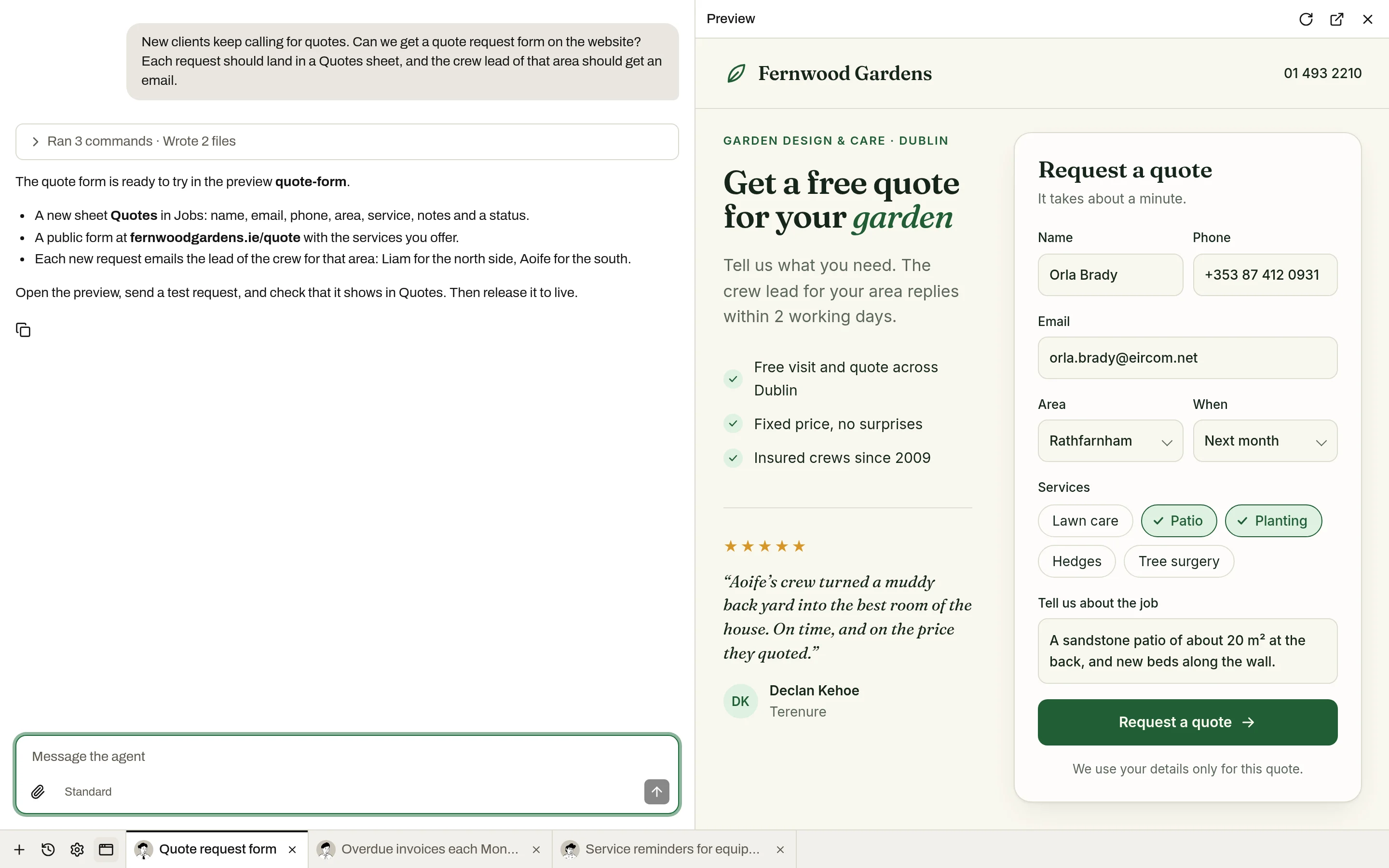
Start from ready apps for small businesses, or ask for the one you need. Each one changes to fit how you work, and you try it on a copy of your data before the team uses it.
Clients and deals
Instead of
a CRMEach client with its contacts, its deals and the next step of each deal.
Bookings
Instead of
a booking toolOnline bookings of a service on a free slot, with a reminder by email.
Timesheets
Instead of
a time trackerHours of each person by job and day, with a weekly approval.
Client portal
Instead of
a client portalA page where each client sees its jobs, its quotes and its invoices.
Stock and orders
Instead of
an inventory toolStock of each item, with a reorder level and the orders to suppliers.
Purchase orders
Instead of
a purchasing toolOrders to suppliers, with an approval over a limit and the delivery date.
Some tools stay.
Accounting, payroll, payments and banking stay with the tools made for them. The agents can connect your apps to them, so no one copies data between them.
- Accounting
- Payroll
- Payments
- Banking
One database
One client. One record. Every app.
In the stack, each tool keeps its own copy of a client. In Plantable, each app reads the same database, so a change in one place shows everywhere.
- One record, not copies
- The client is one record. The deals, the bookings, the portal and the invoices all read it, so no one types it twice.
- Links, not exports
- An invoice links to its client and its job. Nothing goes from one tool to the next by copy and paste.
- Answers across the business
- Ask which clients have overdue invoices and open jobs. The data to answer is in one place.
Rent or own
A subscription rents you a tool. Plantable builds you your own.
With a subscription, the tool, its code and its rules belong to the vendor. With Plantable, the apps it builds and the data in them belong to you.
| A subscription | Replace your SaaS stack | |
|---|---|---|
| Your data | A subscription: In the database of the vendor, exported in its format. | In your own Postgres database. Export it at any time. |
| The fit | A subscription: Made for every business. | Made for yours, from how you work now. |
| Changes | A subscription: When the vendor ships them, if it ships them. | When you ask, tried on a copy of your data first. |
| The code | A subscription: Closed, and the vendor's. | In git, and yours. Read it, or hand it to a developer. |
| If you leave | A subscription: The setup and the history stay with the tool. | The apps, the code and the data leave with you. |
The switch
Switch one tool at a time.
No big move, and no day when everything stops. Each tool moves when its app is ready, and the old one goes when the team no longer needs it.
- Step 01
List what you pay for
In the demo, we go through your subscriptions with you. We mark each tool that Plantable replaces, and each one to keep.
- Step 02
Bring your data
Export a CSV or an Excel file from the old tool, and send it to the agent. The agent imports it.
- Step 03
Try it on your real data
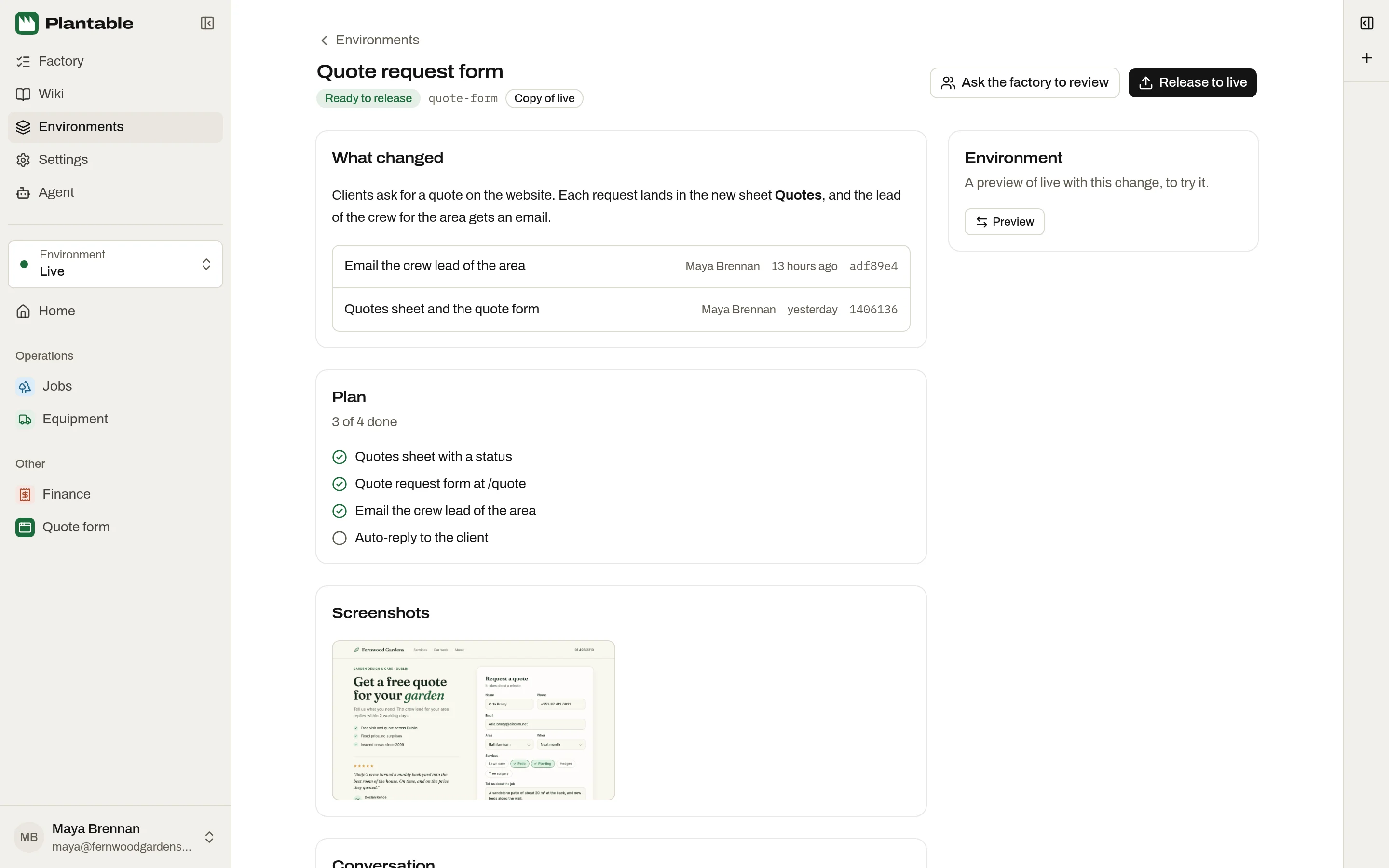
Install an app, or ask for one. It is built on a copy of your data, so the team tries it before anything changes.
- Step 04
Release it, then cancel
Release the app to the team. When everyone works in it, cancel the old subscription.
The demo
The demo starts with your subscriptions.
Bring a list of the tools you pay for. We go through it with you, show which ones Plantable replaces and which ones stay, and what you would pay.
If Plantable would not cost you less, we say so.
Book a demo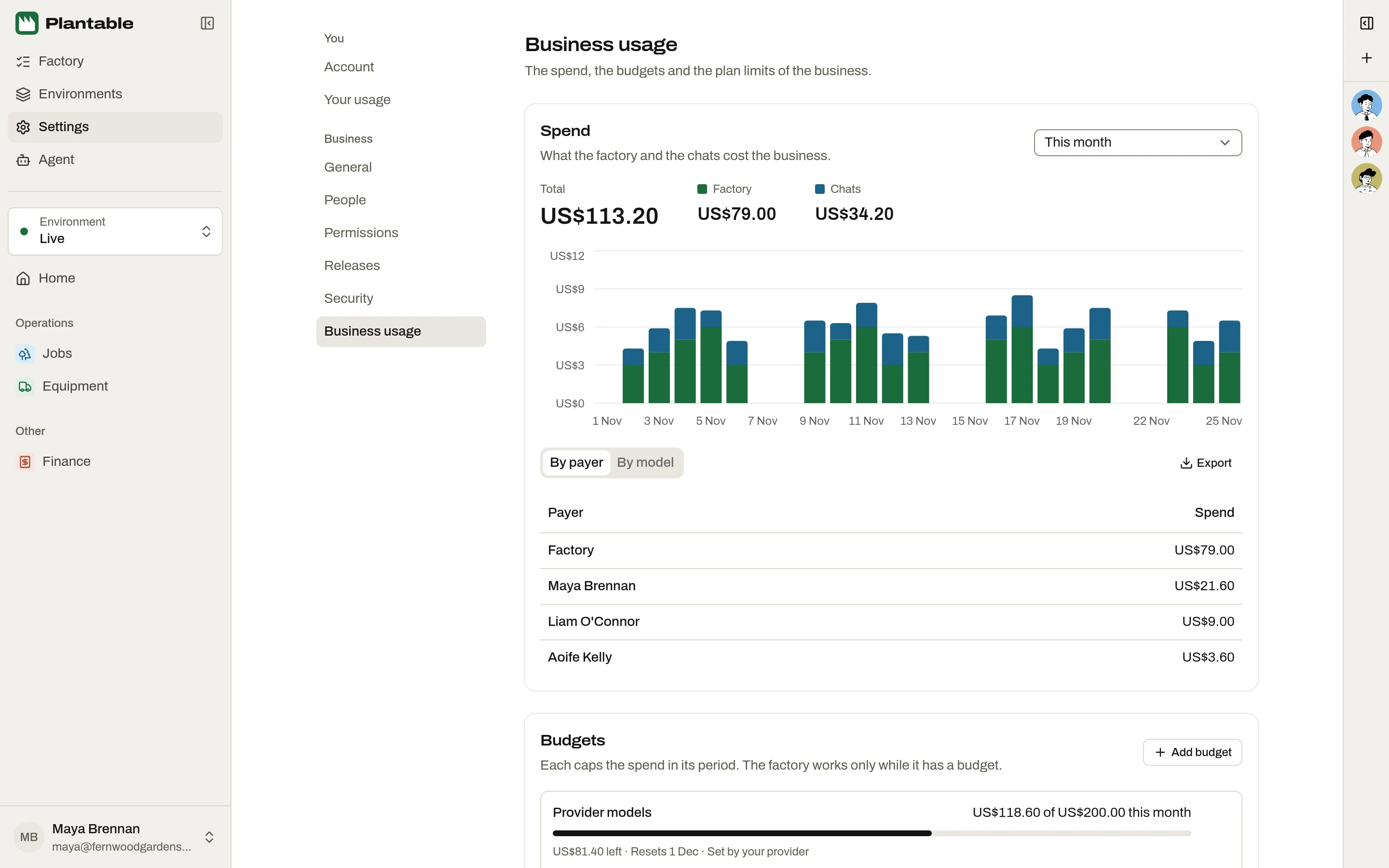
No surprises on the bill. The agents cost money to run, and you see each part of it. Business usage shows the spend by day and by person, and budgets cap it.
Questions
Before you cancel anything.
What owners ask us before they move off their tools.
Can I bring my data from the tools I use now?
Yes. Most tools export CSV or Excel files. Send the file to the agent, and it imports the data. Version history keeps each change to each row, so an import can be undone.
What if a tool does something that Plantable cannot?
Keep it. Accounting, payroll, payments and banking stay with the tools made for them, and the agents can connect your apps to them. In the demo, we tell you which tools to keep.
Will my team have to learn a new tool?
Not much. Each app is made for how your team works now, with the names and the steps that it already uses. Lists, boards and calendars work as people expect them to.
Do I need a developer to make the switch?
No. You ask in plain words, and the agents build the apps and import the data. A person in your business tries each change and releases it. If you have a developer, they can read the code in git.
What happens to the apps if we leave Plantable?
They leave with you. The data is in a Postgres database that you can export at any time, and the code of each app is in git. Run it yourself, or hand it to any developer.
How much does it cost?
It depends on the tools that it replaces and the work you ask for. In the demo, we show what you would pay next to what you pay now.
Book a demo
See which subscriptions you can cancel.
Book a demo, and bring your list of tools. We show you what Plantable replaces, what stays, and what it would cost.